Share your multimodal datasets with the world in Lance format – Keep your scalar data, blobs, embeddings, and indexes together, in one place – and filter and query your data by streaming it directly from the Hugging Face Hub.
We have some exciting news for our open source community: Lance is now officially supported on 🤗 Hugging Face Hub! You can scan, filter, and search large Lance datasets on the Hub in just a few lines of code. 🚀
🤗 Datasets has long been a silent superpower for the AI and data ecosystem. It provides developers with the means to share their datasets with the world via a common API, along with dataset cards (to describe schemas), versioning, caching, and streaming – all wrapped in a seamless workflow that fits naturally into training and evaluation pipelines.
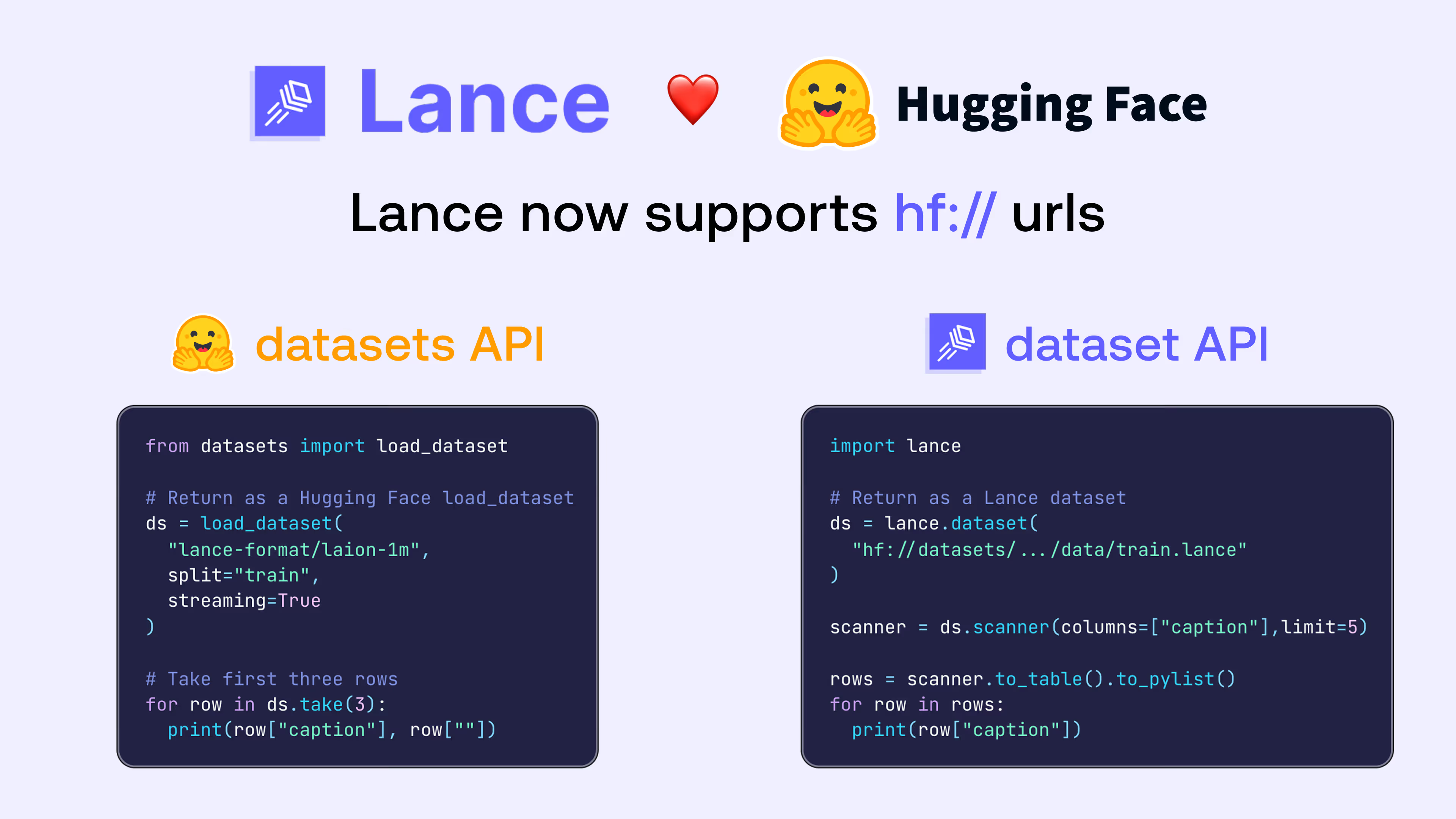
It’s incredibly easy to get started with Lance datasets on Hugging Face. Open a dataset by pointing to a hf://... URI, and begin querying it (with projections, filters, and limits) right away!
💡 For First-Time Users
If this is your first time using Lance, run pip install pylance first to set up your environment.
import lance

# Return as a Lance dataset
ds = lance.dataset("hf://datasets/lance-format/laion-1m/data/train.lance")

scanner = ds.scanner(
    columns=["caption", "width", "height"],
    limit=2
)

print(scanner.to_table().to_pylist())
# [{'caption': 'Cordelia and Dudley on their wedding day last year', 'width': 233, 'height': 315}, {'caption': 'Statistics on challenges for automation in 2021', 'width': 701, 'height': 299}]
Why it matters
Modern AI datasets are increasingly multimodal, consisting of wide tables that pair metadata with features, as well as wide columns within those tables, including embeddings and large binary assets (images/audio/video).
Sharing multimodal datasets using traditional file formats like CSV or Parquet still means storing tables with the scalar metadata in one directory and the binary assets in another, with pointers from the main table to the blobs. Users are often left with a pile of scripts to download, decode, embed, and index the same data on their end, in order to answer questions like “show me images of mountainous landscapes with an aesthetic score > 4.5”.
It doesn’t have to be that way. If you’re an ML engineer, working with a large multimodal dataset that someone else created should feel less like stitching together files from different sources and redoing the expensive work locally, and more like pulling a reusable artifact you can use immediately for your search, analytics or training workloads.
.
When you open a Lance dataset that’s stored on the Hub, it reads that OpenDAL-backed interface, enabling efficient range reads for scans, streaming reads for large blobs, and access to additional dataset artifacts like embeddings and indexes.
The end result for users is a smooth Hub experience: scanning and querying a Lance dataset on the Hub feels as simple as scanning a local table.
Feature breakdown
This section breaks down points worth noting if you’re new to Lance or coming from other formats.
Native support for Lance format
Your datasets in Lance format are natively supported on the Hub, meaning that you can access them via the familiar datasets API from Hugging Face, or Lance’s dataset API.
As a starting point, we’ve released the following multimodal datasets covering long-form text, video and images on the lance-format section of the Hub:
- FineWeb-Edu dataset with over 1.5 billion rows of long-form text and metadata. The dataset comes packed with cleaned text, metadata, and 384-dim text embeddings for retrieval.
- OpenVid dataset with ~1M high-quality videos stored with inline video blobs, embeddings, and rich metadata, all in one table.
- LAION image-text corpus (~1M rows) with inline JPEG bytes, CLIP embeddings (img_emb), and full metadata.
This is just the beginning – over time, we plan to release several more datasets in Lance format across multiple other domains, to share our open source work and experiments with the Hugging Face community.
Preview Lance tables
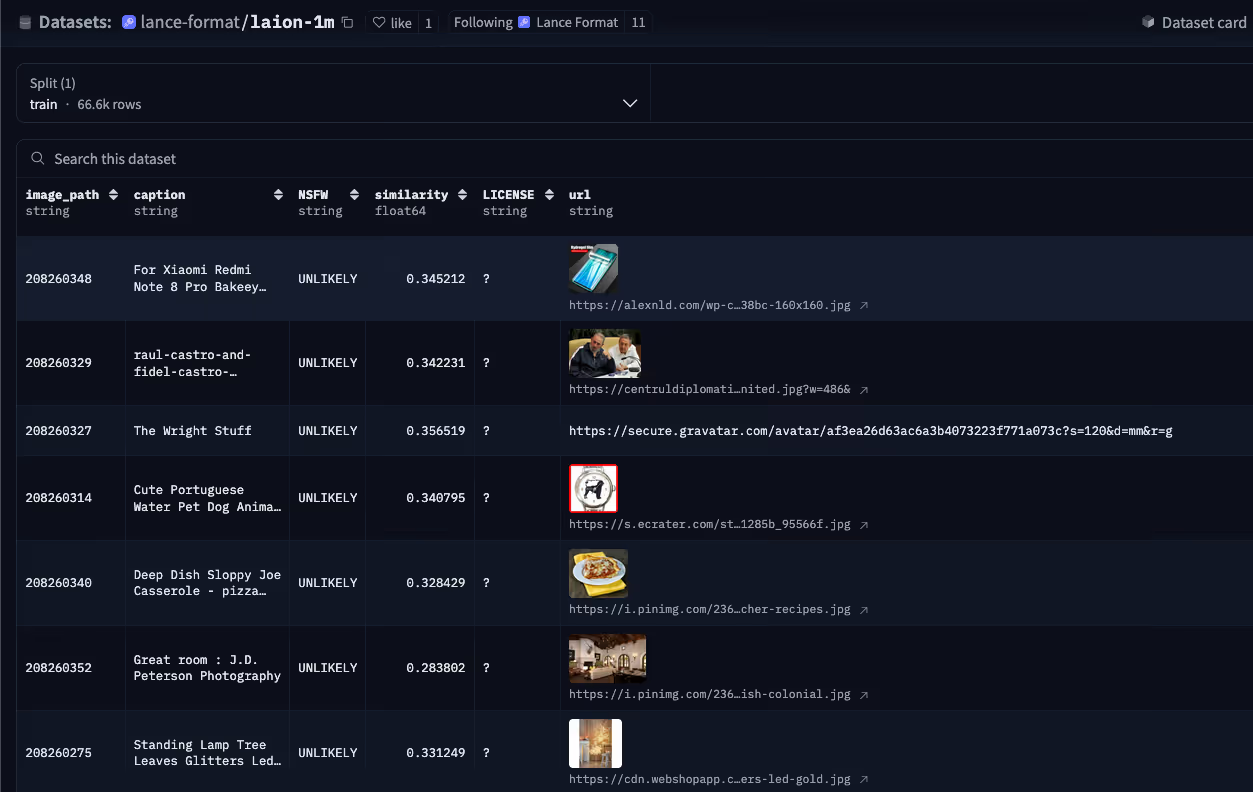
Lance tables look and feel very much like other table formats you may be familiar with. When you upload a Lance dataset, you get a preview of not only the scalar columns, but also images.
Working with large blobs
Large multimodal binary objects (blobs) are first-class citizens in Lance. The OpenVid dataset is a good example to highlight here, because it contains high-quality videos and captions. In Lance format, the video data is stored in the video_blob column, alongside the rest of the dataset.
The example below shows how to use the lance library to browse metadata without loading blobs, and then use the high-level blob API in Lance to fetch the relevant rows.
import lance

ds = lance.dataset("hf://datasets/lance-format/Openvid-1M/data/train.lance")

# 1. Browse metadata without loading video blobs.
metadata = ds.scanner(
    columns=["caption", "aesthetic_score"],
    filter="aesthetic_score >= 4.5",
    limit=2,
).to_table().to_pylist()

# 2. Fetch a single video blob by row ID.
selected_id = 0
blob_file = ds.take_blobs("video_blob", ids=[selected_id])[0]
with open("video_0.mp4", "wb") as f:
    f.write(blob_file.read())
See the dataset card for vector search and other functionality using the lancedb library on the video dataset.
Preview video snippets
Random access on video blobs also unlocks the ability to preview videos in the Dataset Viewer on Hugging Face! Simply hover over the column in the table that contains the video blob to see it animate.
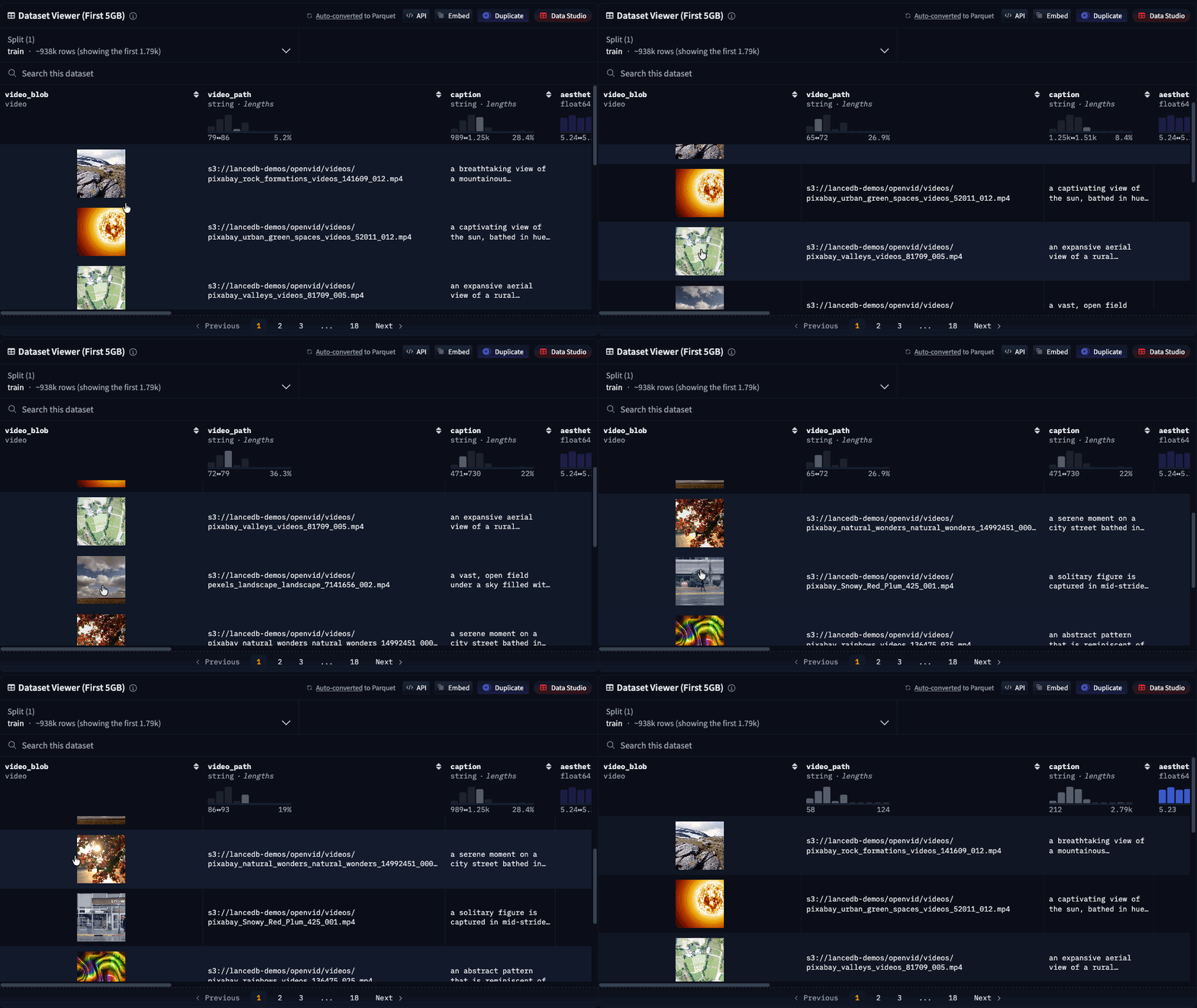
Currently, this still requires a subset of video frames to be copied on the server-side, which adds a small amount of loading time. In the future, we’re hoping to enable sub-second page-loading in the viewer by pointing the HTML directly to the video blobs inside Lance files on the Hugging Face storage system.
Training-friendly blob storage
Lance’s blob API is compatible with torchcodec, so you can easily decode your videos as torch tensors that you can use to train your own video or world models.
from torchcodec.decoders import VideoDecoder

# Define a start and end index
decoder = VideoDecoder(blob)
tensor = decoder[start:end]  # uint8 tensor of shape [C, H, W]
You can also check out the Lance documentation for examples on loading image datasets into torchvision for training your own image models.
Vector search in LanceDB
A Lance dataset on the Hugging Face Hub can bundle both embeddings and their associated indexes, without relying on other systems to manage the index. That means you can open a Lance dataset hosted on the Hub and run nearest-neighbor search without needing to first download the data locally.
LanceDB users benefit from the convenient search features built on top of the Lance format. So whether you use the pylance library directly or the OSS lancedb library, you get the same benefits of portable embeddings + indexes.
The example below shows a LanceDB example of running a vector search using image embeddings.
import lancedb

# In LanceDB, you open a database connection, then a table
db = lancedb.connect("hf://datasets/lance-format/laion-1m/data")
tbl = db.open_table("train")
query_embedding = list(range(768))

results = (
    tbl.search(query_embedding, vector_column_name="img_emb")
    .limit(2)
    .to_list()
)

for item in results:
    print(item["caption"])
Benefits of Lance
Let’s understand the important features of the Lance file and table format that enable this integration, and what it means for the future.
1. Fast exploration on the remote dataset
The OpenVid-1M dataset is a good stress test: it’s video-heavy, and video is where the “metadata table over here, blobs over there” pattern that’s commonly used today starts to creak. In Lance, the large blobs (videos) are stored alongside the scalar data in the same table, allowing you to package the data in a single table that you can easily share and reuse. This is in contrast to the Parquet versions of several popular multimodal datasets, where the binary assets tend to be stored separately, either in different directories, or in different repos entirely.
With the video blob data in Lance, you can query it in place on Hugging Face – scan and filter on metadata while projecting only the scalar columns (skipping the video bytes) to narrow down what you care about without copying the entire dataset. Once you’ve identified the subsets you want, you can download only what’s needed. This enables rapid exploration of large multimodal datasets with minimal unnecessary I/O.
Here’s the high-level workflow that demonstrates how simple this is using Lance:
- Scan and filter the metadata without touching the video bytes (column projection + predicate pushdown).
- Fetch a single video blob on demand (random access) and save just that one to disk.
Under the hood, Lance’s blob abstraction plays an important role in improving performance, because take_blobs(...) returns a file-like object that lazily reads the underlying bytes, rather than forcing you to download the entire MP4 into memory (or write it to disk) up front. Since it behaves like a regular file handle, you can pass it directly to video tooling libraries like PyAV or ML libraries like torchcodec.
Lance helps Hub users perform “video-native” operations – seek frames up to a time offset, decode only a particular window, skip irrelevant frames, and sample/shuffle them for training jobs – while only reading the portions of the blob you actually touch, which is exactly what you want when searching through large datasets.
2. Build the index once, reuse everywhere
One of Lance’s most important design choices is that indexes are first-class citizens of the format. A Lance dataset can bundle the raw data, derived embeddings, and the indexes built over those embeddings in a single artifact – and you can open the dataset and search the index directly from the Hub. A typical Lance dataset on the Hub would look something like this:
├── _indices
├── _transactions
├── _versions
├── data
│   ├── 000001.lance
│   ├── 000002.lance
│   ├── ...
│   └── 00000x.lance
Because the index is part of the dataset (and not managed and synced separately via an external system), consumers of the dataset don’t need to repeat the most expensive steps just to get started. On large multimodal datasets, embedding generation and index construction can dominate time and cost, so being able to reuse precomputed embeddings and indexes means you immediately benefit from the work others have already done.
3. Fast random access for search and training
Using Lance for distributed loading of a large genomic dataset (150B rows with sparse vectors and nested fields) into my training pipeline, I was able to achieve
the throughput of the streaming data loader from the Hugging Face datasets library.
– Pavan Ramkumar, Lance user and ML researcher
Lance is designed for fast random access, and its users are already pushing the format to support training workloads at massive scale (see this issue on GitHub). Training workloads tend to use a common access pattern – many workers doing small, random reads against a single table on object storage, with column projection and caching to keep I/O bounded. Lance helps with this class of workloads because of the following systems-level features:
- Fast random access and scans: pull a subset of rows / blobs you need without “walking” a directory of millions of objects, and rapidly shuffle and load them into batches for large-scale distributed training.
- Fewer metadata roundtrips: the dataset layout efficiently stores mixed-width data in one place for both scanning and retrieval, reducing the I/O overhead that shows up at scale.
- Pre-computed artifacts: when embeddings and indexes are part of the dataset artifact, consumers can reuse them during the exploration phase, instead of copying the entire dataset and rebuilding locally.
By making it easier to manage datasets for training on Hugging Face, our hope is that many more users in the AI/ML community can better reproduce and iterate on others’ work, especially when large multimodal data is involved.
4. Efficient updates without full rewrites
Lance stores the dataset as a collection of fragments with partial schemas. This is the core capability of Lance that we rely on at petabyte-scale: the fact that we can write or delete a single column for a specific fragment without rewriting the rest of the fragment.
– Hubert Yuan, Software Engineer at Exa, in the blog post “exa-d: Data Framework to Process the Web”
In the real world, data and schemas aren’t static: documents change continuously, pipelines evolve, and you often need to iterate on what existed before. Exa, a search engine for agents built on petabytes of web data, describes in their post how they leveraged Lance’s data evolution feature. Some updates are surgical (replace or repair a small slice of the index), while others are sweeping (re-embed everything after shipping a new model, or backfill a new signal across billions of rows).
Hugging Face users working on curating machine learning datasets likely run into the same dynamics at scale across many domains. Video datasets where you need to replace only a subset of corrupted assets, image datasets where you update labels or add model scores, audio corpora where you backfill alignments, and text/code datasets where you re-run parsing or safety filters – these are all too common use cases when working with large multimodal assets. The key requirement is being able to apply targeted changes without triggering rewrite-heavy workflows.
Lance’s ability to backfill new columns without write amplification means that many dataset augmentations would write only what changed (specific rows and/or newly derived columns) while leaving the original large blob data untouched. That makes it practical to do frequent, precise updates – and still support occasional full rebuilds – without paying the cost of rewriting the entire dataset just to modify a single column.
What’s next: I/O savings for datasets at petabyte scale
As datasets evolve and grow in size, the bottleneck often isn’t compute, it’s I/O. This is even more true when working with multimodal datasets that may contain mixed-width columns, some which have large blobs. At petabyte scale, avoiding unnecessary I/O becomes the difference between “iterate quickly” and “wait until the next full table rewrite to make a change.”
Hugging Face’s Xet storage backend and Lance complement each other well. The Xet team has already invested in storage-level deduplication for incremental updates. For large, multimodal datasets, Lance could enhance that further by making updates cheap at the format level with its data evolution capabilities.
To understand the I/O cost savings, consider an example – say you have hundreds of GB of video blobs and want to add a derived feature column that’s <1GB in size (i.e., a tiny fraction of the size of the original dataset). In Lance, you would need to write just that new column while leaving the existing media fragments untouched. When combined with Xet, Lance can help enable massive I/O efficiency gains over time.
Conclusions
Our goal with Lance on the Hugging Face Hub is simple: make sharing and using multimodal datasets feel as straightforward as sharing code. Instead of distributing “metadata here, media there, indexes somewhere else,” you can publish a single dataset artifact that packages the blobs, embeddings, and indexes that developers need in one place, so they can explore and build on top of it.
As the Hub becomes home to ever-larger multimodal datasets in the age of AI-generated content, the trade-offs between efficiency and performance become all the more important. We’re excited to continue building with the Hugging Face team and the open source community, to speed up iteration, reduce unnecessary I/O, and make it easier to power the retrieval, training, and feature engineering workloads of the future.
Try out Lance on the Hub!
Explore more Lance datasets on the Hub, and read the documentation here. We actively encourage you to also publish your own Lance datasets on the Hub and share them with others in the community! 🚀
You can learn more about the Lance-Hugging Face integration by visiting lance.org. While there, learn more about the Lance format, and do join us on the Lance Discord server to interact with our community! 🤗